 Free
Org Charts & Reorgs for Ashby Teams
Visualize your org and model reorgs, free. See comp deltas live.
Top brands trust Pyn

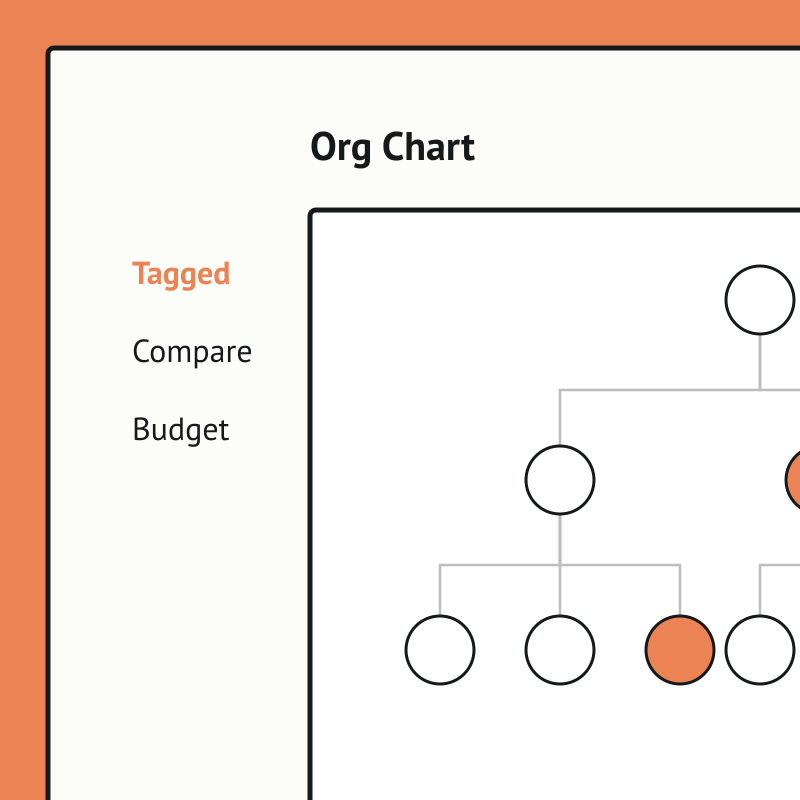
(re)org is a free tool that lets people teams visualize the org and model future scenarios without spreadsheets. Drag people to reshape reporting lines, mark exits and unassigned roles, and compare scenarios side by side, with comp deltas updating in real time.
Org Charts & Reorgs is free, and it runs standalone for now — you can start using it today by uploading your own people data. If there's enough interest we'll build a direct Ashby integration so it syncs automatically. Book a demo and we can cover it.
The payoff is faster, clearer reorg planning. Teams can explore "what if" structures visually, see the cost impact instantly, and align stakeholders on a plan, then export to CSV to save and share the outcome.
Start the journey before day one.
The stretch between offer accepted and first day is where momentum gets lost. For a lot of companies it’s just silence — no welcome, no manager prep, no signal that anyone’s ready for the new hire. So new joiners sit with their excitement and their second-guessing, and hear nothing.
Pyn fills that stretch. The moment Ashby marks a candidate as hired, Pyn kicks off their pre-boarding journey. No manual handoff, no waiting for the HRIS to catch up.
Why connect Pyn and Ashby?
Act at the moment of hire. When Ashby moves a candidate to hired, Pyn catches it and starts pre-boarding on its own. A welcome note, a manager nudge, an IT checklist — all set in motion before anyone has to remember to do it.
Make new hires feel expected, not forgotten. How someone feels in the days between saying yes and showing up colors how they feel about the whole job. Pyn draws on the data from Ashby to send messages that read like a person wrote them — by name, for their role, from their manager.
Give managers a head start. Pyn can send prep reminders and conversation starters to hiring managers as soon as the hire is confirmed in Ashby. By the time the new hire arrives, their manager already knows what to do with the first week.
Close out the loose ends. Outstanding interview feedback has a way of slipping. Pyn can nudge interviewers for the notes and scorecards still sitting open in Ashby, so the record is complete before the handoff.
Build the full picture with your HRIS. Ashby gives Pyn the early signal: who’s joining, when, and in what role. Once your HRIS holds the full employee record, Pyn carries the journey on through onboarding and beyond. Together they cover the entire employee lifecycle from offer to offboarding.
How to connect
Does Pyn integrate with Ashby?
Yes. Pyn connects to Ashby via API. Your Ashby admin provides an API key and the integration is up and running.
What data does Pyn pull from Ashby?
Pyn pulls the key fields needed for pre-onboarding: name, email, start date, job title, department, and hiring manager. That’s enough to start personalized pre-onboarding journeys straight away.
FAQs
When does Pyn start the pre-onboarding journey?
When a candidate is marked as hired in Ashby. Pyn picks up the trigger automatically, with no manual handoff.
Do I still need an HRIS integration?
For pre-onboarding, Ashby is enough. For the full employee lifecycle — promotions, anniversaries, internal moves, offboarding — you’ll want an HRIS connected too. Pyn works with both, and the two integrations complement each other well.
Can I personalize pre-onboarding messages by role or department?
Yes. Pyn uses the role, department, and hiring manager data from Ashby to tailor every message from day zero.
Where do messages get delivered?
Slack, Microsoft Teams, or email — wherever your people actually work.
Is my data secure?
Pyn is SOC 2 compliant. We only pull the candidate fields needed to trigger pre-onboarding automations.
Your HR stack, with superpowers.
Pick the tools you need. Launch in a day. Cancel anytime.