 $1 / employee / month
Onboarding Buddy Using Workday
Pair every new hire with a buddy, automatically. No spreadsheet required.
Top brands trust Pyn



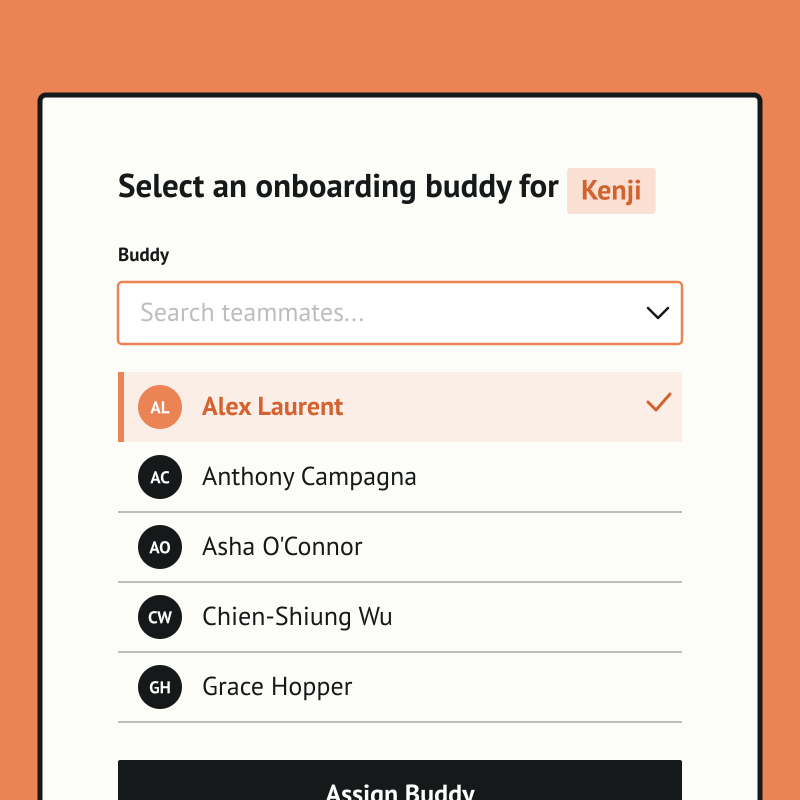
Pyn runs your onboarding buddy program automatically, so every new hire gets a buddy without HR chasing it each time. Managers are prompted to pick a buddy, the chosen person is notified with the context they need, and repeat buddies are flagged so the load spreads fairly. No spreadsheet required.
Because Pyn connects to Workday, it already knows the moment someone starts, gets promoted, changes team, or moves on — there's no list to upload and no one to remind. From there every message is personalized by role, team, and location, delivered where people already work — and nothing slips.
The payoff is faster ramp and a warmer welcome, especially for remote hires. Set it up once and it runs for every hire, and the same pairing works for role changes and returns from leave.
The Workday integration turns the events Workday records, a hire, a promotion, an internal move, a manager change, a departure, into personalized messages in Slack, Microsoft Teams or email. Your Workday admin sets up one Report as a Service (RaaS) report; Pyn’s team validates it and switches the connection on.
Workday captures your people data. Pyn puts it to work.
Workday is excellent at what it is built for: storing employee data, tracking org changes, running payroll. What it is not built for is reaching employees in the flow of their day with a message that feels like it came from a person. Most employees rarely log in.
Pyn sits on top of Workday and does that part. When something changes in Workday, Pyn reacts:
- Send the right message to the right person, in Slack, Teams or email, from their manager or a named person in HR.
- Send polls and forms at the right moment: a probation check-in, a buddy selection, a return-from-leave check.
- Trigger actions in other tools, like adding a new starter to a calendar invite or a Slack channel.
- Run your HR calendar from the same data: salary reviews, holidays by region, company events.
No exports. No distribution lists to maintain. Nobody has to notice, remember or act by hand.
Why connect Pyn and Workday?
Turn Workday events into employee moments. A new hire added, a promotion recorded, a departure logged. Pyn listens for changes in your Workday data and triggers the right communications automatically.
Reach people where they actually work. Most employees rarely log into Workday. Pyn meets them in Slack, Teams or email instead, with messages that feel like they came from a real person rather than a system notification.
Personalize using your Workday data. Pyn uses the fields in your report (role, department, location, manager, tenure and more) to tailor every message. An engineering manager in London gets something different from a new sales hire in Austin.
Cover the whole lifecycle. Onboarding is just the start. Pyn also handles promotions, internal moves, parental leave returns, manager transitions and offboarding, or any other moment driven by a change in Workday.
What you can automate once Workday is connected
- Automated onboarding: pre-boarding, day one, week one and 30/60/90 messages, personalized by role, team and region.
- Manager nudges: a prep reminder when a hire is added to their team, a check-in prompt at 30 days, a conversation starter before a probation review.
- New manager program: triggered the day someone’s direct report count goes from zero to one in Workday.
- Automated moments: promotions, internal moves, manager transitions, parental leave and return, anniversaries, offboarding.
- Onboarding buddies: managers pick a buddy inside Slack or Teams before day one.
- HR calendar: salary reviews, holidays by region and company events against your Workday data.
Browse everything that connects in the integrations catalog, or read 9 Workday integrations worth knowing about for the wider landscape.
Connect Workday with the rest of your stack
Pyn delivers where people already work and can act in the tools around Workday: Slack, Microsoft Teams, Google Calendar, Greenhouse, Lever, Asana and Jira.
Pricing and security
The Workday integration is a Premium connection, reflecting the guided RaaS setup and validation. The Pyn tools you run on top of it are priced the same as for any other HRIS. See current pricing.
Pyn is SOC 2 Type 2 certified and GDPR compliant, customer data is encrypted in transit and at rest, and Pyn pulls only the fields in the report your admin publishes. Pyn is rated 5/5 on G2. Details on the security page.
How to connect
Does Pyn integrate with Workday?
Yes. Pyn connects to Workday through Workday’s Report as a Service (RaaS) feature. Your Workday admin publishes a report with the fields you want to use, and Pyn’s team validates and activates the connection.
How do I connect Workday to Pyn?
Your Workday admin creates a RaaS report using the field list Pyn provides. Pyn checks the report and switches the integration on. Then you choose which fields are active in Pyn.
How long does Workday setup take?
It involves a few steps with your Workday admin to configure the RaaS report, then Pyn validates the connection. Pyn’s team guides you through it.
What data syncs from Workday?
Name, work email, start date, department, manager and location by default. You can include any other field in the report, such as job profile, region or tenure, depending on what you want to trigger or personalize. You can review the list at any time.
How often does Pyn sync with Workday?
Regularly, typically hourly. Pyn checks the report for changes so your automations run on current data.
FAQs
Can I personalize messages using Workday fields?
Yes. Pyn can use any field from the report to show or hide sections of a message. An engineering manager in London gets something different from a new sales hire in Austin, from the same automation.
Does Pyn only work for onboarding?
No. Pyn covers the whole employee lifecycle: pre-boarding, promotions, internal moves, new managers, anniversaries, leave and return, offboarding, and any other moment driven by a change in Workday.
Where do messages get delivered?
Slack, Microsoft Teams or email, wherever your people actually work. Messages can come from a real person rather than a system account.
Can Pyn update Workday as well as read from it?
Most teams use Pyn to act on what Workday records. If you want an automation to update Workday too, talk to us about the use case.
Is my Workday data secure with Pyn?
Pyn is SOC 2 Type 2 certified and GDPR compliant, and data is encrypted in transit and at rest. Pyn pulls only the fields you choose to include, and you can review that list at any time.
How much does the Workday integration cost?
Workday is a Premium connection. See the pricing page for plan details.
Your HR stack, with superpowers.
Pick the tools you need. Launch in a day. Cancel anytime.