
The buyer’s guide to modern onboarding platforms
A practical guide to evaluating onboarding platforms. Learn why onboarding breaks, what capabilities matter most, how HRIS and ATS tools fall short, and how to choose a platform that supports people from day one through every transition that follows.

Written by
Stacey Nordwall, People and Product
Onboarding shouldn’t feel like a scramble. But for most HR teams, it still does. Start dates shift. Managers forget steps. Content lives in too many places. Things fall between the cracks during handoffs between teams. The tools we rely on — HRISs, ATSs, shared documents — don’t fit together well enough to create a consistent onboarding experience.
While things like checklists and laptop orders are part of onboarding, they’re far from the whole picture. Modern onboarding goes deeper. It sets the tone for the employee experience and supports people through the early transitions that matter most — not just in week one, but in the weeks and months that follow.
An onboarding platform exists to support these transitions. At its best, it automates the coordination work HR has been doing by hand and delivers the right message, to the right person, at the moment they need it. It helps managers follow through, gives new hires clarity, and takes repetitive tasks off your plate.
This guide is here to help you make sense of the onboarding software landscape. We focus on the problems HR teams are trying to solve, the features that make a real difference, and the questions that will help you find a solution that works for your organization.
By the end, you'll have a clear sense of:
- How onboarding breaks
- Which problems onboarding software is best placed to solve
- The capabilities that make onboarding feel consistent, personal, and human
- How onboarding platforms complement your HRIS and ATS
- What global or multi-region teams should look for
- How to run a focused vendor evaluation
- What to consider if you want onboarding to extend naturally across the employee journey
No buzzwords. No generic checklists. Just the information you need to choose a platform that supports people from day one through every transition that follows.
What HR teams tell us about why onboarding breaks
On paper, onboarding looks straightforward. In practice, it’s one of the hardest and most intricate processes to run. Even well-resourced HR teams can struggle to keep it consistent, personal, and timely. And while onboarding is often treated as something that ends after week one, people keep onboarding as they learn their role, build relationships, and adjust to how things work.
In our conversations with HR teams, these are the challenges we hear most often.
Manual, repetitive work slows everything down
“I’m recreating the same onboarding steps every single time.”
Copy-pasting messages, updating spreadsheets, and sending one-off reminders makes onboarding fragile and time-consuming.
Managers don’t have visibility or don’t follow through
“No one reads long emails or attachments — things just get missed.”
Even strong managers need timely nudges. Otherwise, HR can end up acting as project manager and reminder system.
Everything lives everywhere
“Our onboarding is split across Slack, Google Docs, Notion, Jira… nothing stays consistent.”
Scattered tools lead to inconsistent experiences and extra lift to keep information updated.
Our HRIS and ATS weren’t built for this
“System notifications get ignored and are too basic and restrictive.”
Systems of record are great at storing data. They’re not great at delivering timely, human guidance.
The experience doesn’t feel personal
“Everything sounds automated. New hires can tell.”
People notice when messages feel like templates. Without personalized touchpoints, onboarding comes across as generic and transactional.
Hybrid or distributed onboarding adds complexity
“I can personalize it… but I don’t want to keep track of so many versions of the same message.”
Different roles and locations need different information, but most tools don’t make versioning manageable.
Lean teams can’t scale manual workflows
“There’s no way we can keep doing this by hand.”
Without automation, onboarding depends on heroic effort from HR teams and quickly breaks as teams grow.
Why these pain points matter
When onboarding feels inconsistent or chaotic, new hires feel it. Managers feel it. And HR definitely feels it. Good onboarding software won’t fix everything, but it reduces the issues teams spend the most time fighting: inconsistency, missed steps, and manual coordination.
What to look for in an onboarding platform
Choosing onboarding software isn’t just about comparing feature lists. It’s about finding a tool that solves the real problems your team faces every day. Below are the capabilities we recommend reviewing when evaluating solutions.
1. Automation that reduces manual work
You shouldn’t have to copy-paste and update versions of the same messages, rebuild workflows, or track tasks in a separate spreadsheet. Look for automation that:
- Triggers workflows based on key lifecycle dates
- Adjusts automatically when dates shift
- Handles manager reminders without HR intervention
- Reduces repetitive work, instead of creating new admin steps
- Replaces scattered checklists with one clear source of truth
2. Personalization that scales and feels human
People notice when onboarding is generic. Good software helps you tailor information without creating dozens of versions or sounding automated. Look for tools that support:
- Conditional messaging by location, role, team, or employment type
- Dynamic fields that keep content relevant without manual editing
- Clear logic for “who sees what and when”
- Choosing the sender so messages feel like they come from a person, not a system
- Templates you can rewrite in your own voice
This is the kind of personalization that scales and provides consistency, not canned communication.
3. Delivery where and when people already work
Managers and new hires need information delivered within their workflows in the places they check throughout the day. Look for platforms that support:
- Direct messages within the flow of work (Slack, Teams, SMS)
- Clear, concise steps that appear at the right time, in the right time zone
- Actions completed inside the message rather than in separate portals
This is one of the most reliable ways to increase message awareness and follow-through.
4. Visibility into what's working
Onboarding shouldn’t feel like guesswork. Look for tools that provide:
- Insights into message engagement
- Visibility into which steps managers complete and which are overdue
- Signals about where new hires may need additional support
Visibility helps you improve onboarding based on data, not assumptions.
5. Support for cross-functional coordination
HR is not the only team involved in onboarding. IT, managers, finance, and operations all play a role, but that doesn’t mean they should all log into an HR platform or see employee data. Look for systems that:
- Assign tasks to the right teams without exposing sensitive data
- Offer strong permissions so teams only see what they need
- Integrate with the systems other teams use (Jira, ticketing tools)
- Trigger tasks in those systems automatically
- Make handoffs predictable for HR, even when work happens elsewhere
The goal isn’t to pull every team into an HR platform. It’s to ensure work gets done in the systems people already rely on.
6. Flexibility for your organization’s size and structure
Organizations change all the time. Your onboarding platform shouldn’t be the thing that breaks when they do. Look for systems that:
- Handle org structure changes without breaking workflows
- Make it easy to update content once and apply it everywhere
- Adapt to different employment types
- Allow you to add steps or change logic as your processes evolve
- Support distributed or hybrid teams through time-zone-aware scheduling and conditional content
Flexibility means the system supports the way your organization actually works, not the way the platform expects you to work.
7. A foundation that can extend beyond onboarding
People don’t just onboard once. They re-onboard whenever they take on a new role, join a new team, move locations, or return from leave. Look for tools that:
- Trigger workflows when someone moves to a new role, team, or location
- Surface the right information so employees understand what’s changing
- Guide managers through what they need to do during these transitions
Supporting these moments increases the value you get from your tools. With limited resources, it’s worth choosing platforms that can support multiple use cases across the employee journey — not just the first week.
How HRIS and ATS tools fall short and how onboarding platforms complement them
HRIS and ATS systems play an essential role in hiring and onboarding, but they weren’t built to support the day-to-day experience people actually have when they join a company. Their onboarding features typically focus on forms, checklists, and basic notifications. Those tools are helpful for tracking compliance, but they often don’t offer the timing, personalization, or guidance that new hires and managers need as they settle into their roles.
Because of these limitations, HR teams end up creating an “experience layer” on top of these systems. That often means copy-pasting messages, sending one-off reminders, or managing onboarding information across Slack, Google Docs, and spreadsheets. It works, but it’s a lot of manual effort and easy for things to slip through the cracks.
Onboarding platforms are designed to complement—not replace—your HRIS and ATS. They deliver the right messages to the right people at the right time, support cross-functional coordination, and help new hires navigate the moments that matter. Basically, the HRIS handles the data and the tasks and the onboarding platform handles the experience.
What hybrid or distributed teams should look for
Hybrid and distributed teams need more than a one-size-fits-all onboarding workflow. Different locations, roles, and employment types often require different information, timing, and expectations. A good onboarding platform makes this manageable without forcing HR to build endless versions of the same workflow.
Look for systems that:
- Support conditional messaging by location, role, employment type, or department
- Make it easy to version content without duplicating entire workflows
- Handle time-zone differences so messages arrive when they’re useful
- Provide clear visibility into who is receiving what content across regions
- Keep core onboarding consistent while allowing for local variation where it matters
Effective distributed onboarding isn’t about building a separate process for every location. It’s about giving people the information that’s relevant to them — and doing it in a way that doesn’t add more work for HR. Tools that can handle this gracefully tend to hold up better as organizations grow, hire globally, or shift their operating models.
What to ask in an onboarding vendor evaluation
Most onboarding platforms look similar in a demo. The difference usually shows up in the details. For example, how well the platform handles change, how much work it adds or removes for HR, and whether the experience will hold up once people start using it. Asking the right questions helps you understand how a tool will work for your organization in practice, not just in theory.
Here are the questions we recommend exploring with every vendor:
- Can you talk me through what happens if a start date changes at the last minute?
This helps you see whether workflows break or if the system adjusts automatically. - How does the platform decide who receives which messages?
You want to understand how conditional logic works and whether it’s easy to maintain. - How do managers receive reminders, and can you show me the experience from their point of view?
Manager follow-through can be one of the biggest failure points in onboarding, so understanding their experience is important. - Can you show how the platform handles different locations, roles, or employment types without duplicating workflows?
This demonstrates whether the system actually supports personalization at scale. - Where do messages get delivered, and what does that look like for new hires and managers?
The more the platform works within existing workflows (Slack, Teams), the better adoption tends to be. - When tasks involve IT or other functions, how does the platform integrate with their existing systems?
You should see how it triggers work in Jira or other tools without exposing HR data. - What kind of visibility does HR have into what’s been completed, what’s overdue, and where people may need extra support?
Insight helps you improve the experience over time. - How easy is it to update content or logic, and what happens to existing workflows when you make changes?
This shows whether the platform will be stable as your organization evolves. - Can you talk me through how the platform supports transitions beyond a new hire’s first week?
Promotions, role changes, and manager changes often need the same level of guidance as onboarding. Ideally an onboarding platform can scale to support other employee moments. - What permissions and access controls are available for cross-functional teams?
This helps ensure that the right people see what they need and nothing more.
These questions help you understand how well a platform handles the realities of onboarding: shifting dates, different audiences, cross-functional work, and evolving organizational needs. Not every platform will be able to answer “yes” to all of your questions. What matters most is understanding which capabilities are essential for your team, your workflows, and the way your organization operates today.
The onboarding software landscape
There’s no shortage of tools that touch onboarding, but they don’t all solve the same problems. Most fall into a few clear categories. Understanding these differences can help you set realistic expectations and avoid choosing a tool that only solves one part of the picture.
Below is a high-level view of the approaches organizations commonly use to manage onboarding.
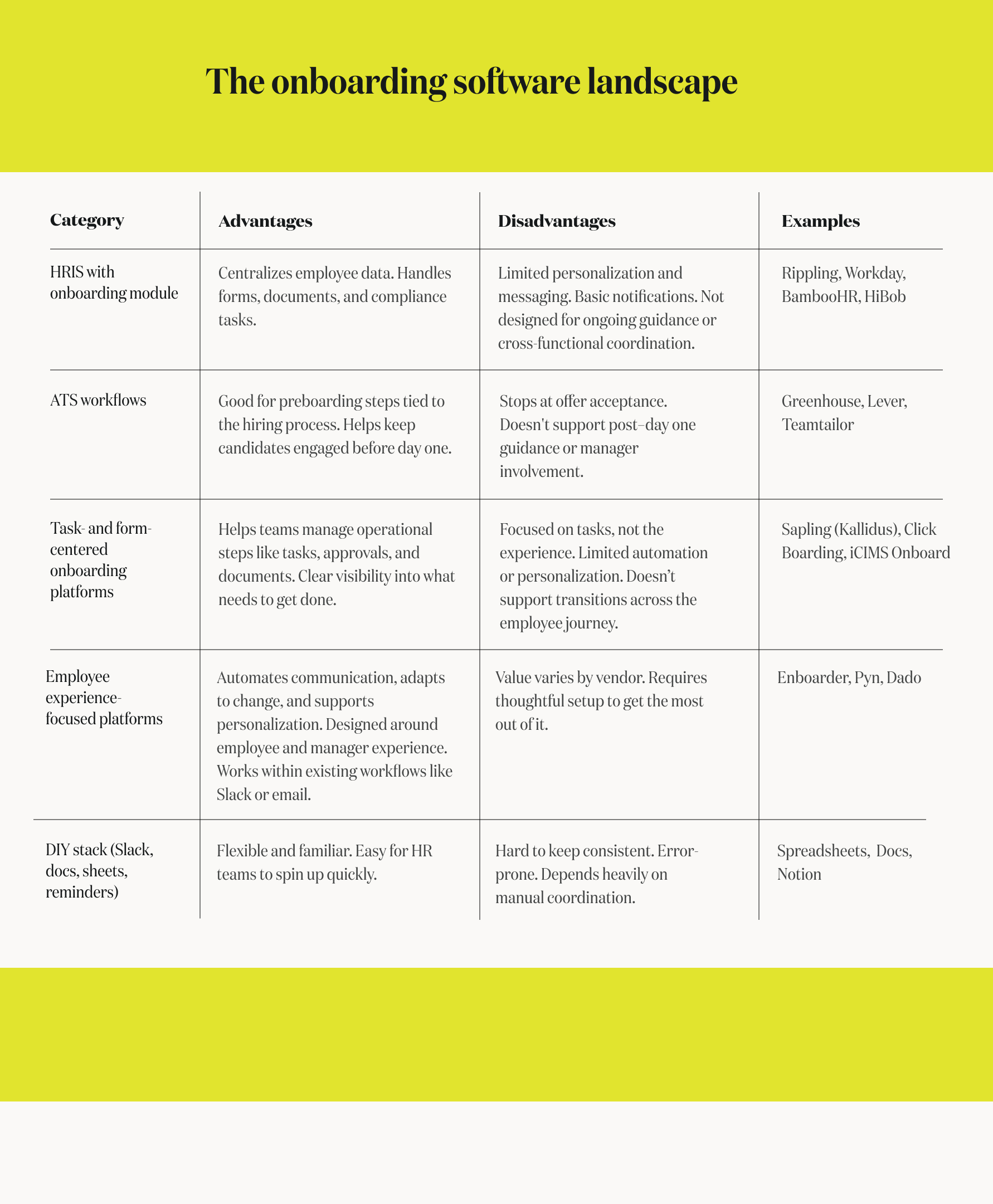
HRISs do what they were built to do: hold data and keep information organized. Employee experience platforms do what HR teams have been doing manually for years: communicate, guide, and support people through key moments. The strongest onboarding comes from pairing the two — the HRIS manages the data, and the EX platform delivers the support people actually need.
Onboarding should extend beyond week one
Onboarding doesn’t end after a new hire’s first week. People are still learning their role, building relationships, and figuring out how things work well into their first few months. And throughout their time at an organization, employees go through “mini-onboardings” — switching roles, joining new teams, getting new managers, moving locations, or returning from leave. These transitions bring just as much uncertainty as day one and require the same clarity, timing, and support.
When evaluating onboarding platforms, it’s worth considering how well they support these additional moments. Many tools handle the first weeks of onboarding but stop there. The platforms that create lasting value are the ones that can extend naturally into other employee transitions, giving people the guidance they need whenever something changes, not just when they arrive.
Summary and next steps
Choosing an onboarding platform is ultimately about the kind of experience you want your people to have. The right tools reduce manual work, help managers follow through, personalize information without creating version sprawl, and deliver guidance when it’s actually needed. And because onboarding doesn’t end after week one, the strongest platforms support the full range of transitions people move through — new roles, new teams, new managers, new locations.
As you evaluate options, focus on how each system handles change, supports your managers, and adapts as your organization evolves. Look for tools that reduce complexity instead of adding to it, and that help you deliver an experience that feels consistent, personal, and human.
If you’re exploring platforms built to support onboarding and the broader employee journey, Pyn is designed for exactly that: automating the right messages to the right people at the right time, across all the moments that matter.